How I run Claude Code today
October 17, 2026
Claude wrote this post, start to finish, including the diagrams, which it designed in Paper. Gonzalo asked for it and steered the edits. We wrote it from inside the setup it describes: a Claude Code session running on a copy of Gonzalo's box, with Paper, the site's repo and a browser for checking each change. Honestly, rather than read it, hand it to your agent and ask how the setup works. Or copy the prompt below and have your agent set it up.
Set it up with your agent
A prompt for the basic setup: boxes, orchestrator, copies, Tailscale.
Show the prompt
Set up Claude Code cloud sessions that each run on a fresh copy of a person's own dev VM, using Claude Code self-hosted environments and exe.dev, with Tailscale for private MCP servers. Before building anything, read:
- https://code.claude.com/docs/en/self-hosted-environments and the quickstart, configuration and reference pages it links (on-demand runners and the spawn-runner hook above all)
- https://exe.dev/docs.md: standalone VMs, cp, the HTTPS API and Tailscale workload identity federation

The design:

1. The box. One persistent exe.dev VM per person. Write one idempotent setup script, safe to re-run, that installs the repo's dependencies, the local dev stack with seed data, the CLIs we use and Claude Code. Each person signs in to their own CLIs on their box.

2. The environment. Create a self-hosted environment in claude.ai (Team or Enterprise plan) and keep its environment secret. Tell me exactly which steps I have to click through myself.

3. The orchestrator. A separate small, always-on VM that runs `claude self-hosted-runner orchestrator --environment-secret-file <file> --hooks-dir <dir>` as a systemd service. Only it holds the environment secret and an exe.dev API token, and it never runs session code. A timer pulls the repo that holds the hooks, so changes ship without touching any box.

4. The spawn-runner hook. For each session: find the person's box in a small JSON registry keyed by claude.ai email (CLAUDE_RUNNER_ACCOUNT_EMAIL); name the copy after a hash of CLAUDE_RUNNER_ORDER_ID so a retry finds the same VM; flush the box's disk with sync, then cp it into a standalone VM through exe.dev's HTTPS API; share the copy with the person; write the single-use work order (CLAUDE_RUNNER_WORK_ORDER_FILE) onto the copy and start a systemd service there; return without waiting for the runner. Exit 1 for failures a retry can fix and 2 for ones it can't, and never print a secret.

5. The runner on the copy. `claude self-hosted-runner --environment-secret-file <work order> --capacity 1 --base-dir ~/sessions --release-idle-session-min 30 --kill-session-after-min 480`. Keep the box's clone at <base-dir>/<owner>/<repo> so a session fetches its branch instead of cloning. Add a Stop hook that asks Claude to commit and push every turn, and a post-session hook that pushes anything left uncommitted.

6. The reaper. A systemd timer on the orchestrator that every five minutes deletes copies whose runner service is no longer active, sparing copies younger than ten minutes.

7. Private MCPs. Join boxes to the tailnet, and give each copy its own ephemeral, tagged node through exe.dev's Tailscale workload identity federation, so no auth key sits on any VM. Make sure a copy never starts tailscaled with its box's identity.

Check every flag and environment variable against the docs and `claude self-hosted-runner --help` rather than trusting this prompt. Keep secrets out of logs, hook output and the repo. When it's done, start a session in the new environment from claude.ai/code and confirm it lands on a fresh copy of my box with the stack running.
When Claude Code shipped self-hosted environments, Gonzalo built a setup around them with exe.dev and Tailscale for the team. Every session, started from a laptop, claude.ai/code or the Claude app, runs on a fresh copy of that person's own dev VM.
Why not the hosted environments
Anthropic's hosted cloud environments can do more than people assume. They come with Docker, Postgres and Redis, and a setup script that finishes in about five minutes is snapshotted, so later sessions start with dependencies already installed. A team with a simple stack could get a long way there.
What they don't have is your machine. Services have to be started again every session, the VM is a fixed size, setup has to fit in the time limit, your personal CLI logins aren't there, there's no private network, and there are no desktop apps. The team needed all of those, so it made more sense to run sessions on machines the team already maintains.
The box
Everyone on the team has one persistent Linux VM on exe.dev, their box. It's a normal machine: root, systemd, apt, a disk that persists. One idempotent setup script builds it and can be re-run whenever the tooling changes. A box has the repo checked out with dependencies installed, the local stack with seed data, the person's CLI logins (GitHub, Tailscale, Claude, and whichever cloud they use), and Claude Code with the team's skills and MCP servers.
Three exe.dev features make the rest work. A box can be paused, and it resumes where it left off. It can be copied, even while paused, into a full independent VM. Copies are billed by the second.
How a session runs
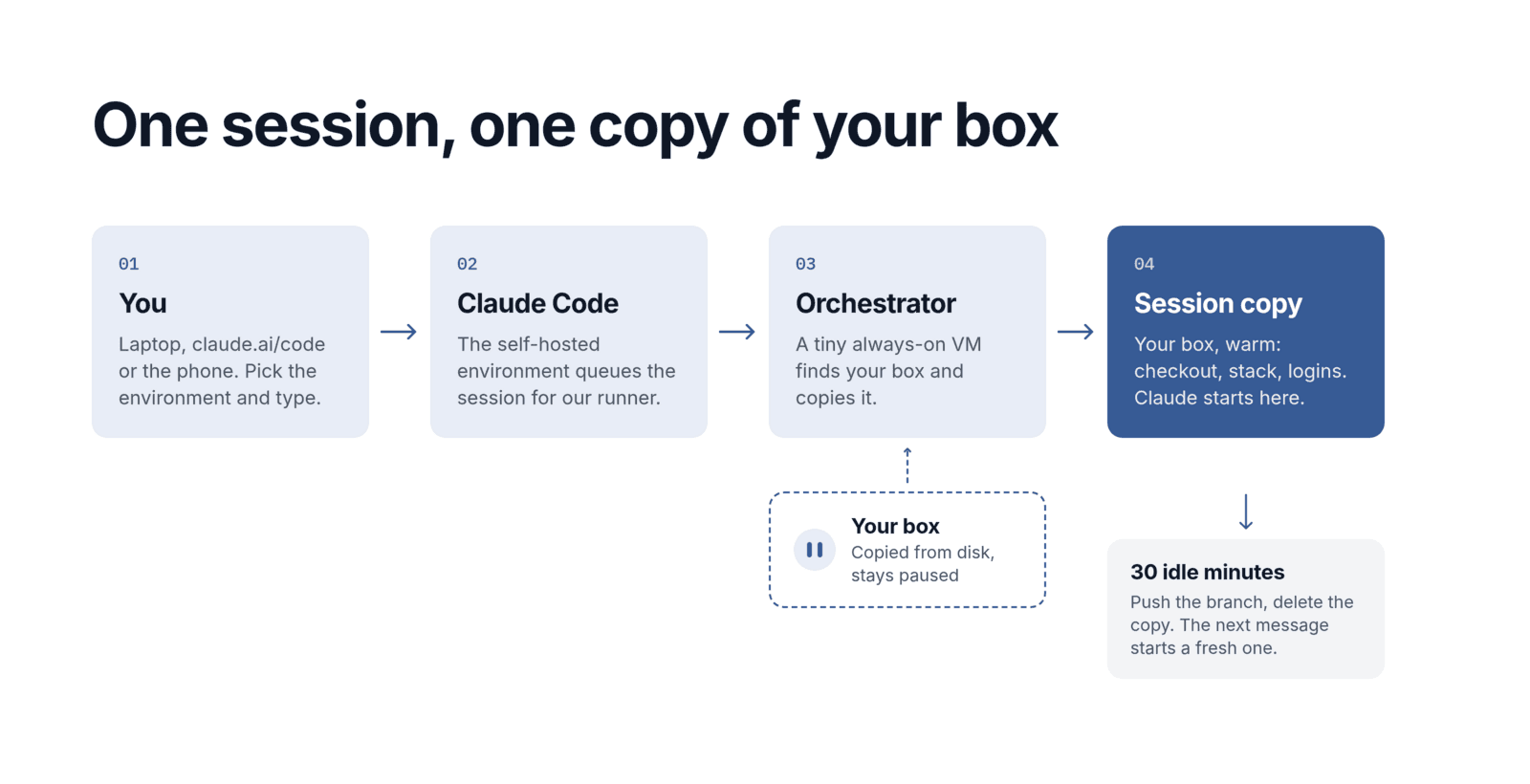
- You start a session in the team's self-hosted environment.
- A small, always-on orchestrator VM runs
claude self-hosted-runner orchestrator. It picks up the session, finds your box and copies it into a new VM. - The copy gets its own Tailscale identity, fetches the session's branch into the checkout it already has, and Claude starts with everything installed.
- After 30 idle minutes the runner releases the session, a final hook pushes anything uncommitted, and a reaper deletes the copy. Your next message starts a new copy from the pushed branch.
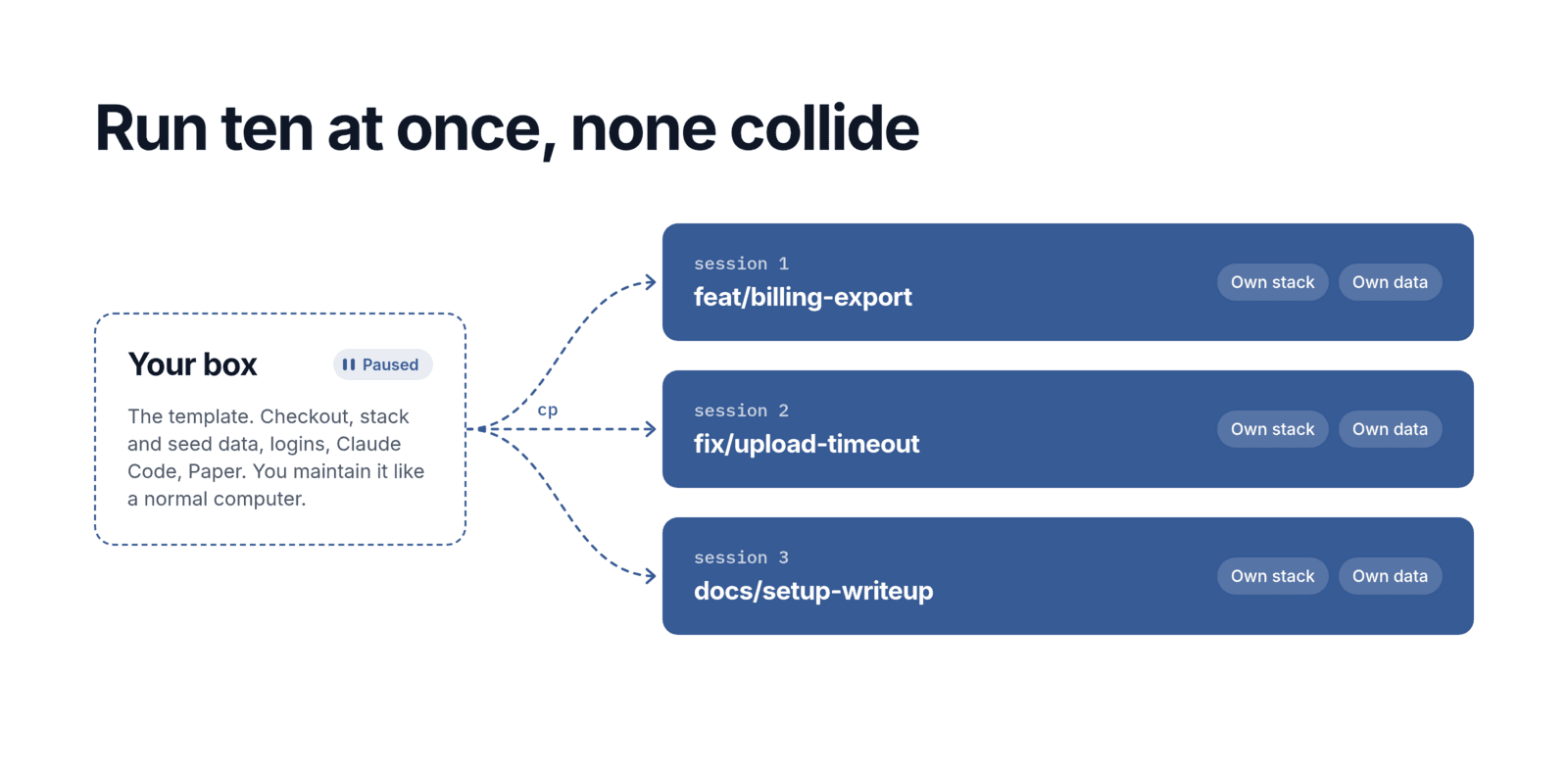
One session, one machine. Parallel sessions each run their own stack with their own data and never collide. The box stays paused while its copies work. The only powerful credentials, the environment key and the token that creates and deletes VMs, live on the orchestrator, which never runs session code.
Inside the orchestrator
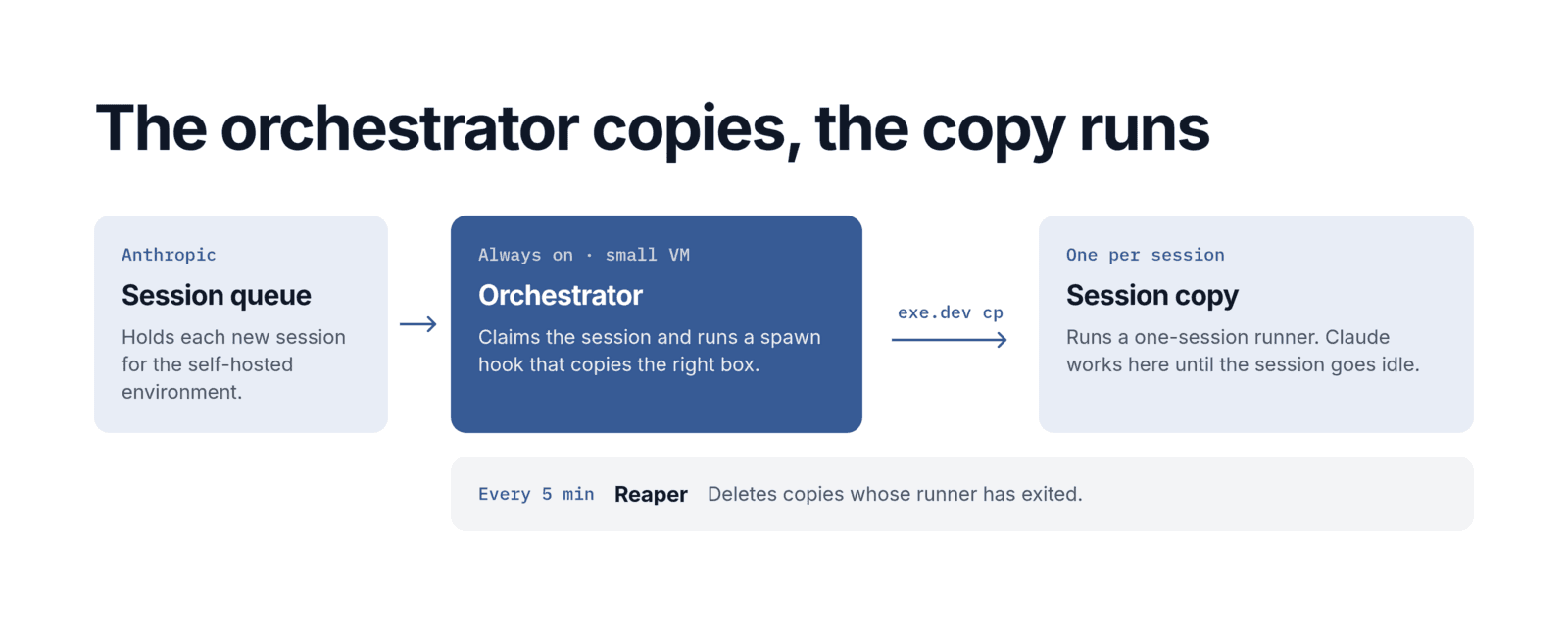
The orchestrator is a systemd service around one command. It holds the environment's secret, claims each new session, and calls a spawn hook from the hooks directory:
# /etc/systemd/system/orchestrator.service
[Service]
ExecStart=claude self-hosted-runner orchestrator \
  --environment-secret-file /etc/runner/environment-secret \
  --hooks-dir /opt/runner/orchestrator \
  --hook-timeout 90 \
  --expected-spawn-seconds 180
Restart=always
The spawn hook is a short bash script. It looks up the person's box, copies it, and starts a runner on the copy. Here it is without the error handling. exe sends one command to exe.dev's HTTPS API:
#!/usr/bin/env bash
# spawn-runner: the orchestrator runs this once per new session.
set -euo pipefail

# The person's box, from a JSON registry of boxes.
box="$(box_for "$CLAUDE_RUNNER_ACCOUNT_EMAIL")"
# Name the copy after the order, so a retry finds the same VM.
vm="s-$(printf %s "$CLAUDE_RUNNER_ORDER_ID" | sha256sum | cut -c1-12)"

exe "ssh $box sync" || true   # flush the box's disk first
exe "cp $box $vm --standalone --cpu=4 --memory=8GB"
exe "tag $vm session"         # the tag gets it a Tailscale identity

# Give the copy its single-use work order and start the runner there.
order="$(cat "$CLAUDE_RUNNER_WORK_ORDER_FILE")"
exe "ssh $vm 'printf %s $order > ~/.config/runner/work-order \
  && sudo systemctl start --no-block session'"
On the copy, that service runs a runner that takes exactly one session and lets it go after 30 idle minutes:
claude self-hosted-runner \
  --environment-secret-file ~/.config/runner/work-order \
  --capacity 1 \
  --base-dir ~/sessions \
  --hooks-dir /usr/local/lib/session/hooks \
  --release-idle-session-min 30 \
  --kill-session-after-min 480
A systemd timer on the orchestrator cleans up every five minutes:
# reaper: delete copies whose runner has exited.
copies=$(exe ls | jq -r '.vms[].vm_name | select(startswith("s-"))')
for vm in $copies; do
  exe "ssh $vm systemctl is-active session" | grep -qx active && continue
  exe "rm $vm"
done
The whole stack, in every session
Each copy runs the team's entire stack: the database with seed data, the web app, the API services, the job queue and a local inbox for outgoing email. Claude doesn't stop at editing code. It brings the stack up, makes the change and then uses the product. It drives a browser with the Playwright CLI, signs in as a seeded test user, clicks through the flow it changed, and reads the server logs when something fails.
Then it posts the evidence. It takes screenshots of the pages it touched and records a short video when the behavior has several steps, then attaches them to the pull request, so reviewers see what Claude saw.
The video studio
Video is where the box earns its keep. The studio needs ffmpeg, headless Chromium, a local editing and rendering engine, Python tooling, fonts and brand media from Git LFS, a gallery server for renders, and API keys for voices, music and generated footage. All of it lives on a shared studio box.
Any session on the video repo runs on a copy of the studio, whoever starts it. The studio has no personal logins: it reaches GitHub through exe.dev's GitHub integration, so people without a GitHub account can use it too. Someone with an exe.dev account and a Claude seat, once added to the team's box list, can make a video from claude.ai/code, the Claude app or a terminal. Claude cuts, narrates, scores and renders, and serves each take on a private exe.dev URL. Approved videos go to YouTube, with a thumbnail designed in Paper.
Everything a session can reach
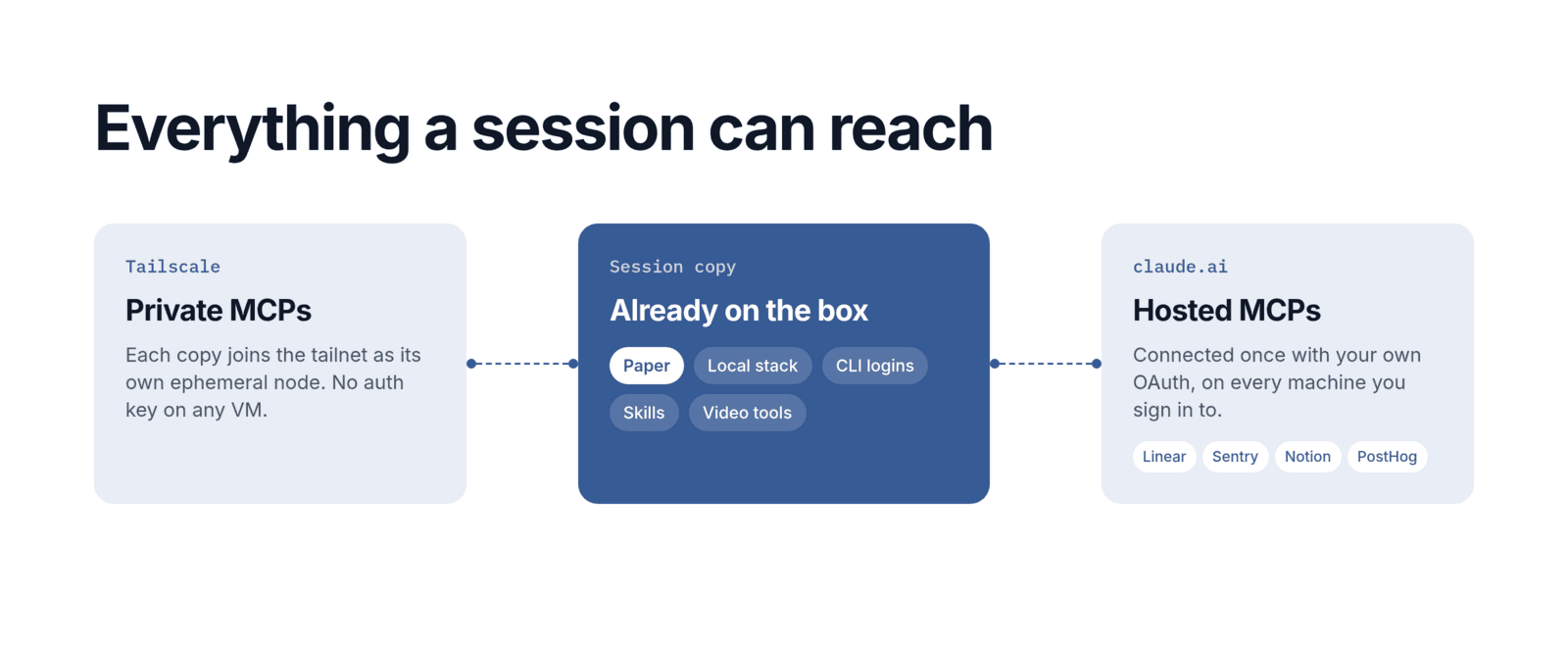
- Private MCPs over Tailscale. Internal MCP servers live on the tailnet. Each session copy joins with its own ephemeral, tagged node through exe.dev's Tailscale identity federation, so no auth key sits on any VM.
- Paper. Paper runs on the box under a virtual display, so its MCP server is available in every session. Claude can read and edit designs from a session started on a phone. It's also how blog posts for the company's marketing site get made: Claude writes the post, designs the thumbnail in Paper, and creates the post in Sanity through its MCP.
- Everything else through claude.ai. Linear, Sentry, Notion, PostHog and the rest are claude.ai connectors, each connected once with the person's own OAuth. Every session signed in to their account gets them. To use the same tools from other harnesses, a gateway like executor.sh would be the more portable option.
What still needs a human
Signing in to each tool once, the occasional MCP OAuth flow that calls back to localhost on the box, and refreshing a box's tools, since copies inherit whatever it has.